Table of Contents
- Why Conference Attendee Engagement Makes or Breaks Your Event
- 1. Interactive Conference Activities That Get Everyone Participating
- 2. Conference Icebreakers That Build Real Connections
- 3. Conference Networking Activities That Go Beyond the Handshake
- 4. Conference Attendee Engagement Tools and Event Technology
- 5. Compelling Session Content and Scheduling That Holds Attention
- How to Measure Conference Attendee Engagement and Prove ROI
- Frequently Asked Questions
Last Updated: October 16, 2026
Why Conference Attendee Engagement Makes or Breaks Your Event
Conference attendee engagement is the measure of how actively people participate in your event, from asking questions to connecting with each other. When it works, people stay longer, remember more, and come back next year.
Here’s what most planners miss: engagement isn’t a vibe you hope for. It’s a design choice you make before anyone walks through the door. Every session, break, and transition is either pulling people in or letting them drift.
This guide covers five proven ways to keep conference attendees engaged, plus how to measure whether any of it actually worked.
Engagement is built into the schedule, not added as an afterthought. Plan the interactive moments before you book the speakers.
1. Interactive Conference Activities That Get Everyone Participating
Interactive conference activities turn passive listeners into active participants. The goal is simple: give people something to do within the first ten minutes, and they’ll stay involved for the rest of the day.
Live Polling and Real-Time Q&A
Live polling is the fastest way to wake up a room. Pose a question, show the results on screen, and suddenly everyone has an opinion.
Real-time Q&A works the same way. Instead of one brave person at a microphone, everyone can submit questions. Upvote the best ones, and the speaker answers what the room actually cares about.
A common mistake is saving Q&A for the last five minutes. By then, half the room has mentally checked out. Build short Q&A windows into every session instead.
Hands-On Workshops and Experiential Programming
Workshops beat lectures for retention. When attendees build, test, or taste something, they remember it. Experiential programming follows the same logic: give people a real experience, not just a slide deck.
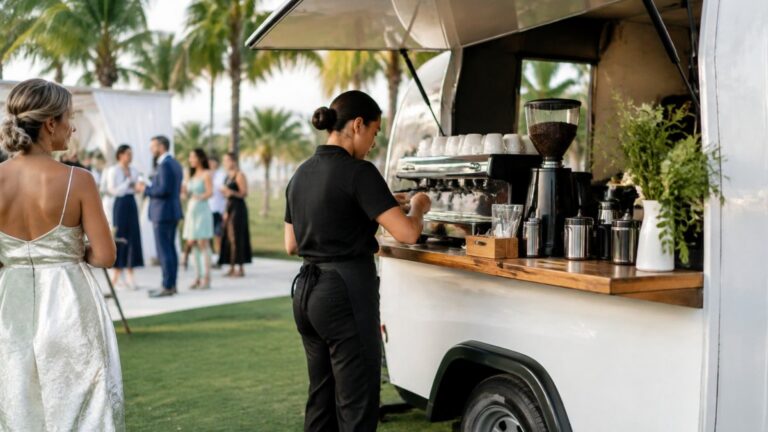
For corporate events, this might mean a live demo station or a small-group problem-solving sprint. For brand activations, it often means something guests can see, smell, and share. A mobile espresso cart, for example, turns a coffee break into a moment people photograph and post. That’s engagement you can watch happen in real time.
2. Conference Icebreakers That Build Real Connections
Conference icebreakers work best when they feel like play, not homework. The old “turn to your neighbor and share one fun fact” routine gets groans for a reason. People want something lighter and more social, and they want it to end before it overstays its welcome.
The mechanics matter more than the idea. A good icebreaker has three parts: a clear prompt, a short time limit, and a reason to keep talking after the timer stops. Skip any one of those and you get awkward silence or a room that disengages the moment the facilitator moves on.
Try these formats instead:
- Two truths and a lie, in small groups. Keep groups to four or five people so everyone gets a turn. Give each person 60 seconds, then have the group vote on the lie. The reveal is where the conversation actually starts.
- “Find someone who” bingo tied to session topics. Build the card around what people will actually discuss that day, “has presented at a conference,” “works with a remote team,” “has tried a tool you’re curious about.” First person to a full row reports back in the next session.
- Speed networking with timed prompts. Three minutes per pair, a new prompt each round, and a bell you actually ring. Prompts like “what’s the biggest problem on your desk right now” beat “tell me about yourself” every time.
- Table trivia with mixed teams. Assign teams at random so people don’t default to their coworkers. Five questions, five minutes, small prize. The point is the shared problem, not the win.
Making Icebreakers Work for Every Attendee
Not everyone wants to perform. Build in a low-stakes option: a written prompt card people can fill out and trade, or a two-person pairing instead of a group share.
For hybrid and virtual events, run the same prompt in the chat or a breakout room. Pair remote attendees with in-room attendees using a shared doc or a video room on a screen at each table.
Keep the whole thing to five or ten minutes. Icebreakers that run long eat into the session and teach attendees that your agenda is loose.
Test your icebreaker with a small group before the event. If it takes longer than you planned or the prompt falls flat, cut it. A mediocre icebreaker is worse than no icebreaker.
Scavenger Hunts and Conference Bingo
Scavenger hunts and conference bingo turn the whole venue into a game. Attendees collect stamps, find hidden QR codes, or snap photos with new contacts. Bingo cards can mix networking tasks with session trivia, so people learn while they play.
Make the tasks specific and achievable. “Meet someone from a different industry” works. “Find the CEO” does not, unless you’ve told the CEO they’re part of the game.
Add small prizes to sweeten it. Branded merch, a gift card, or a reserved seat at the keynote all work. The competition matters less than the excuse to talk to strangers.
3. Conference Networking Activities That Go Beyond the Handshake
Conference networking activities should create real conversations, not just exchanged business cards. Structured formats beat open mingling almost every time, because open mingling favors extroverts and leaves everyone else standing by the snack table.

What works:
- Themed lunch tables by industry or interest
- Guided “meet three new people” challenges
- Small-group roundtables with a shared prompt
- Hosted coffee breaks where baristas serve and chat
That last one is underrated. A drink station gives people a reason to stand together and a natural opener. A freshly made latte or matcha gives strangers something to talk about besides the weather.
Put your networking stations where people already gather, like the coffee line. Conversations start faster when there’s a shared activity and a few minutes of waiting time.
4. Conference Attendee Engagement Tools and Event Technology
Conference attendee engagement tools handle the logistics so your team can focus on people. The right event app keeps everything in one place: schedules, maps, polls, and chat. The wrong stack adds noise, drains your budget, and gives attendees one more login to forget.
Start with what you actually need to run the event, then add engagement features on top. Most planners find that a single app with polls, Q&A, and messaging beats three separate tools that don’t talk to each other.
Event Apps, Push Notifications, and Social Content Walls
An event app gives attendees a home base. They check the agenda, message each other, and get updates without hunting for a printed program. Push notifications keep momentum going, but use them sparingly. A common pattern is two to four notifications per day: a morning agenda reminder, a session change if needed, and one social or networking prompt.
A social content wall pulls attendee posts into one live feed. It rewards people for sharing and gives everyone a reason to check the screen between sessions. Just make sure you moderate it and get consent before featuring anyone’s photos.
Avoiding Engagement Fatigue and Handling Attendee Data
More notifications and more activities do not equal more engagement. They equal fatigue. Build in quiet periods, during keynotes, during breaks, and after the last session of the day. Make every activity optional, and tell attendees that. A poll they can skip feels very different from a poll they feel pressured to answer.
Handle attendee data transparently. Tell people what you’re collecting, why, and how long you’ll keep it. Give them a way to opt out of tracking without losing access to the app.
Accessibility and Inclusive Engagement
For accessibility, always caption videos, offer transcripts, and check that your app works with screen readers. Provide a non-app way to participate, a printed Q&A card, a text-to-screen number, or a staffed help desk, so attendees who don’t want to use their phones can still take part. Inclusive engagement isn’t a bonus feature. It’s how you keep every attendee in the room.
Implementation, Staffing, and Contingency Planning
Technology fails. Plan for it. Before the event, run a full tech check on the venue Wi-Fi, test the app on the devices your attendees actually use, and confirm your A/V team can display poll results and Q&A on screen.
Build a low-tech fallback for every digital activity. If the app goes down, can you run the poll with a show of hands? If the Wi-Fi drops, can you collect Q&A on index cards? The events that recover fastest are the ones that planned for the failure before it happened.
Don’t launch a new engagement tool on event day. If your team hasn’t used it in a dry run, your attendees will be the ones debugging it.
5. Compelling Session Content and Scheduling That Holds Attention
Compelling session content starts with the speaker, not the slide deck. A great presenter with plain slides beats a dull one with fancy graphics every time. Invest in speaker coaching and give presenters a clear brief on your audience.
Scheduling matters just as much. Long blocks without breaks kill energy. Try this rhythm:
- 30 to 45 minute sessions
- Short breaks between blocks
- Interactive moments every 15 minutes
- High-energy content right after lunch
Also, build in time for people to move. Sessions that run back-to-back with no buffer leave attendees choosing between the bathroom and the next talk. That’s a choice no one should have to make.
Packing the agenda too tight is the most common scheduling mistake. When sessions run long, breaks vanish, and attendance drops for the rest of the day.
How to Measure Conference Attendee Engagement and Prove ROI
Measuring conference attendee engagement means tracking both what people did and how they felt. You need numbers and feedback to prove the event was worth the spend.
Track these:
- Session attendance and drop-off rates
- Poll and Q&A participation rate
- App logins and messages sent
- Social posts and content wall submissions
- Post-event survey scores
Pair the data with short follow-up surveys. Ask attendees what they remember, who they met, and whether they’d return. That mix of hard numbers and honest feedback tells you what to keep and what to cut.
For a deeper benchmark on event performance, the Events Industry Council research publishes annual data on attendee behavior and satisfaction. For accessibility standards that keep every attendee included, the Web Content Accessibility Guidelines from W3C set the baseline for captions, contrast, and screen reader support. And for broader trends in how people gather and connect, Harvard Business Review’s coverage of event strategy offers useful context.
Keeping a room of conference attendees engaged takes more than a good speaker and free coffee. It takes planning, the right tools, and moments people actually want to share. That’s where we come in.
Frequently Asked Questions
How do you keep conference attendees engaged throughout a full-day event?
Vary the format every 60 to 90 minutes. Alternate between keynote presentations, interactive conference activities like live polling, and unstructured networking breaks. Schedule hands-on workshops after lunch when energy dips. Add small surprises like a branded coffee cart or pop-up snack station between sessions. The goal is to change the pace before attention drops, not after.
What activities increase audience participation at a conference?
Live polls, quizzes, and real-time Q&A tools get immediate participation because they are low-effort and visible to the room. Conference icebreakers like scavenger hunts or conference bingo work well early in the day. For deeper involvement, try roundtable discussions or hands-on workshops where attendees create something. Participation rates climb when activities feel optional but rewarding, not mandatory.
How can event planners measure attendee engagement?
Track session attendance, participation rates in polls and Q&A, event app usage, and social media mentions during the event. Afterward, send a post-event survey asking attendees to rate sessions and networking value. Compare attendance numbers across time slots to spot scheduling problems. These data points show whether engagement efforts worked and where to adjust for the next event.
How long should conference sessions be to keep attendees engaged?
Keep most sessions between 30 and 45 minutes. Research and event industry norms suggest attention drops sharply after 45 minutes without interaction. If a topic needs more time, break it into two parts with a short break or activity in between. Panel discussions can run 60 minutes if the moderator keeps energy high and involves the audience through questions.